Quick answer: On Cloudways Flexible you pick the underlying cloud when you launch a server: DigitalOcean, Vultr, Linode, AWS or Google Cloud. DigitalOcean, Vultr and Linode use the same list price in every region, cap the bill at the advertised monthly price if the server runs all month, and have cheap bandwidth overages. AWS and Google Cloud prices vary by region, are billed hourly with no monthly cap, and charge much more for extra bandwidth. The five-day Flexible trial covers DigitalOcean, Vultr and Linode only, not AWS or Google Cloud.
Cloudways Flexible is not one set of servers. When you launch a server you also pick the infrastructure underneath it: DigitalOcean, Vultr, Linode, AWS or Google Cloud. The Cloudways panel, stack, backups and support stay the same; the bill, the data-center map, how you are charged for a partial month, and what extra bandwidth costs all change with that choice. This guide is about that choice. It is not a comparison of Cloudways against running those clouds yourself, which we cover in DigitalOcean vs Cloudways, and it is not a full price list of every Cloudways plan, which is in Cloudways pricing. Every figure below comes from Cloudways' pricing page and help center, all read on 13 November 2026. We have not run the same site on all five providers.
Short answer: pick DigitalOcean, Vultr or Linode for a predictable monthly cap and cheaper bandwidth; pick AWS or Google Cloud for their regions, faster scaling and snapshot backups, and budget for higher, usage-based bandwidth. The Flexible trial does not include AWS or Google Cloud.
The five Flexible providers, in Cloudways' own words
Cloudways' pricing page describes five Flexible clouds (Cloudways pricing). Its help article on choosing a provider, updated 29 January 2026 and re-read on 13 November 2026, adds the practical trade-offs (Which infrastructure provider do I have to choose?):
| Provider, as named by Cloudways | How Cloudways describes it | Cloudways' suggested fit |
|---|---|---|
 DigitalOcean | Affordable; SSD standard and NVMe premium servers; 9 locations listed on the pricing page (the help article lists 10, including Atlanta) | Budget apps, development and test |
| Vultr | Standard SSD and high-frequency NVMe servers; the help article lists 17-plus data centers | Budget apps, development and test; lots of city choices |
| Linode (Akamai) | Consistent performance; 25 data centers on the pricing page | Budget and mid-tier apps |
| AWS | EC2 with configurable storage and bandwidth; 28 data centers; standard and compute-optimized lineups; vertical scaling up and down | Enterprise and global apps |
| Google Cloud (GCE) | Standard, compute-optimized and high-compute lineups; 28 data centers; vertical scaling up and down | Enterprise and global apps |
Cloudways' recommendations in that help article are straightforward: DigitalOcean, Linode or Vultr if you are watching the bill or running a simple site; AWS or Google Cloud if you want high performance, a global footprint or faster scaling. You can run servers on different providers in the same account. Each new server is chosen from scratch; it does not inherit the last server's cloud (pricing FAQ).
Billing: monthly caps vs always-hourly
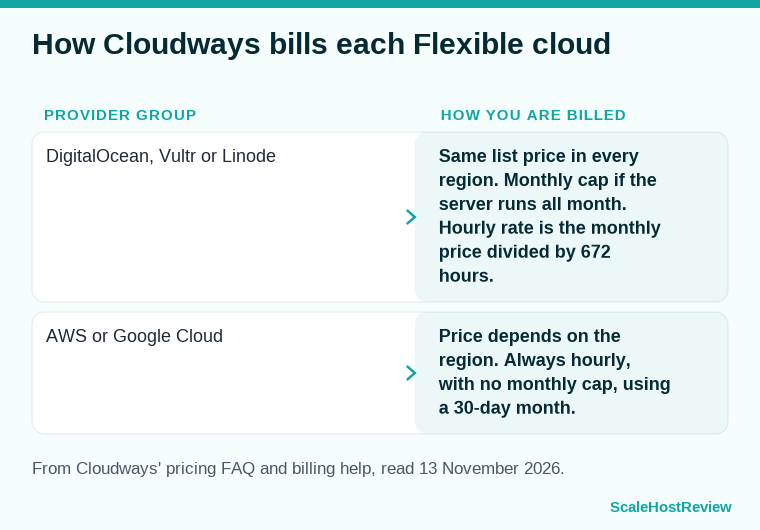
This is the difference that shows up on the invoice. Cloudways' pricing FAQ and its billing help article (updated 2 March 2026) agree on the split (monthly vs hourly billing, pricing FAQ):
| DigitalOcean, Vultr and Linode | AWS and Google Cloud | |
|---|---|---|
| List price by region | The same price wherever you put the server | The price depends on the region, usually lower in North America and Europe and higher in Asia Pacific and South America |
| If the server runs all month | You pay no more than the advertised monthly price, even in a 30- or 31-day month. The hourly rate is the monthly price divided by 672 hours (28 days) | There is no monthly cap. Billing is always hourly, using a 30-day month |
| If the server runs only part of the month | You pay the hourly rate for the hours it was active | You pay the hourly rate for the hours it was active |
| If you resize mid-month | Each size is billed for the hours it ran, at its own hourly rate. The monthly cap applies only if a single size ran the whole month | Always hourly, at each size's rate |
Two traps sit next to that table. First, stopping a server does not stop the bill. Cloudways' pricing FAQ says stopping only pauses the server; the resources stay allocated, so billing continues as if it were running. Deleting the server is what ends future server charges; you still pay for the time it was active. Second, third-party add-ons such as DNS Made Easy are billed for the full month once they are turned on, even if you remove them later (billing help).
Bandwidth overages: a small number until it is not
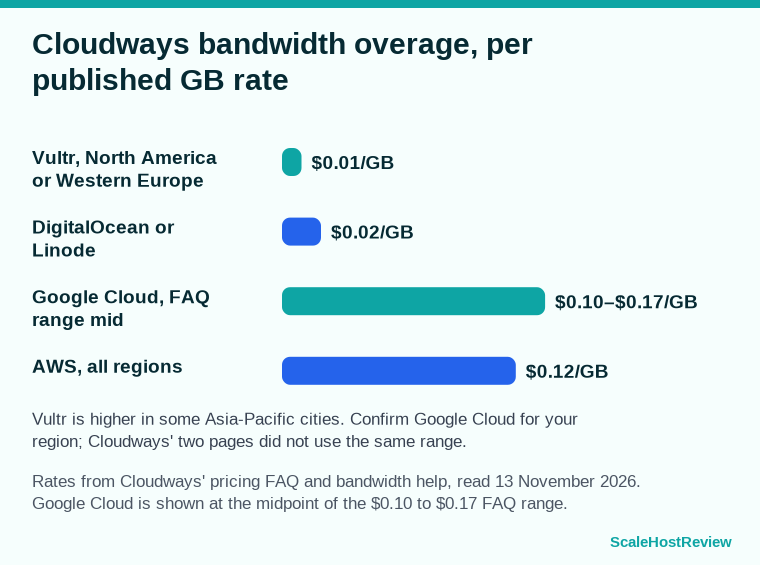
Plans include a transfer allowance. If you go over, the site stays up and Cloudways bills the extra at the underlying provider's rate. The pricing-page FAQ and the bandwidth help article (updated 7 April 2026) list these figures, read on 13 November 2026:
| Provider | Overage, per Cloudways | Notes |
|---|---|---|
| Vultr | $0.01 per GB in North America and Western Europe; $0.025 in Singapore and Tokyo; $0.05 in Sydney | Both the FAQ and the help article use these figures |
| DigitalOcean | $0.02 per GB | Same in both sources |
| Linode | $0.02 per GB | Same in both sources |
| AWS | $0.12 per GB in all regions, billed on last month's actual use | The help article's example: 100 GB costs $12 |
| Google Cloud | The pricing FAQ says $0.10 to $0.17 per GB by region. The help article says $0.11 to $0.17, and gives $0.14 per GB (so $14 for 100 GB) for North Virginia | Confirm the rate for your region before you launch |
On a busy media or WooCommerce site, that gap matters more than the server's list price. 1 TB of overage would be about $10 on Vultr in North America, $20 on DigitalOcean or Linode, and $120 on AWS, using only the rates above. Those are arithmetic on Cloudways' published rates, not a measured bill. Off-site backup storage is separate and is billed at $0.033 per GB on every Flexible server (pricing FAQ).
Starting prices we could confirm, and what we could not
The Flexible pricing cards are selected by provider. On 13 November 2026, with DigitalOcean Premium (NVMe) selected, Cloudways listed:
| DigitalOcean Premium plan (read 13 Nov 2026) | Monthly | Hourly, as shown | RAM / vCPU / storage / transfer |
|---|---|---|---|
| 1 GB | $14 | $0.0208 | 1 GB, 1 vCPU, 25 GB NVMe, 1 TB |
| 2 GB | $28 | $0.0417 | 2 GB, 1 vCPU, 50 GB NVMe, 2 TB |
| 4 GB | $54 | $0.0804 | 4 GB, 2 vCPU, 80 GB NVMe, 4 TB |
| 8 GB | $99 | $0.1473 | 8 GB, 4 vCPU, 160 GB NVMe, 5 TB |
The same page also showed DigitalOcean General Purpose and CPU Optimized cards, and a $37 DigitalOcean option at 2 GB RAM / 2 vCPU / 60 GB / 3 TB. Vultr, Linode, AWS and Google Cloud prices are on the same page once you switch the provider control, but those cards were not captured in the static copy we could read, so this article does not invent their starting prices. Cloudways says you can use its pricing calculator without an account, and that you will see the exact monthly price for the plan, size, provider and region before you confirm a launch. For AWS and Google Cloud, check the region you will actually use, not the cheapest one listed. Our hosting cost estimator works from the Cloudways DigitalOcean figures already sourced on this site.
The pricing page also advertised an 80% Black Friday discount for the first two months, capped at $200 off per month, after which the listed price returns. That is a promotion, not the list price, and it can end. Do not use the discounted figure as the ongoing cost.
Scaling, backups and the free trial
Cloudways' provider guide is frank about operational differences (which provider to choose):
- Scaling speed. AWS and Google Cloud: scale up or down in under five minutes, with downtime. DigitalOcean, Linode and Vultr: scale up in under ten minutes, also with downtime; there is no direct scale-down, so you clone the server instead.
- Snapshot backups. Listed for AWS and Google Cloud, not for DigitalOcean, Linode or Vultr. Cloudways' regular backups are stored on Amazon infrastructure for several of these providers, and the article says AWS restores are the fastest.
- A stopped server. On DigitalOcean, Linode and Vultr, full server charges continue. On AWS and Google Cloud, disk charges continue.
- The Flexible trial. Five days, no credit card. It includes DigitalOcean, Vultr or Linode, not AWS or Google Cloud. You can move to either of those later. When the trial ends the server is deleted unless you add a payment method, in which case Cloudways says it is restored with your apps and data (pricing FAQ).
If you want to compare providers with a real site, Cloudways itself suggests launching on more than one cloud and testing, which the trial makes possible on the three cheaper providers.
A simple way to choose
| Your situation | Start with | Why |
|---|---|---|
| A WordPress or WooCommerce site on a budget, visitors in one or two regions | DigitalOcean, Vultr or Linode, in the closest data center | Flat monthly cap, cheap bandwidth, and you can try it on the five-day trial |
| You already know you will burst through the transfer allowance every month | Vultr in North America or Western Europe, or DigitalOcean / Linode if the city you need is only on those maps | Overage is $0.01 per GB on Vultr in those regions, $0.02 on the other two, and much higher on AWS and Google Cloud |
| You need a city or country the cheaper clouds do not list, or snapshot backups, or faster vertical scaling | AWS or Google Cloud, after you have priced that exact region | Those are the features Cloudways attributes to them. Budget for usage-based bandwidth and the lack of a monthly cap |
| You want fully managed WordPress without picking a cloud at all | Consider Cloudways Autonomous, which Cloudways says runs on Google Cloud, or another managed host | Autonomous is a different product, with its own plans, and is covered in our pricing guide |
Once the server is running, changing clouds means launching a new server and migrating the site, not flipping a switch. Pick the provider carefully, then size the plan using Cloudways pricing and, if you are moving a site, what to measure before you migrate.
 See Cloudways Flexible plans and start the 5-day trial →May earn a commission.
How we checked this: we read Cloudways' Flexible pricing page, its pricing FAQs, the 29 January 2026 help article on choosing an infrastructure provider, the 2 March 2026 billing article and the 7 April 2026 bandwidth article, all on 13 November 2026. DigitalOcean Premium list prices are from the pricing cards as they rendered that day. We did not launch servers on all five clouds. Provider lists, regions and rates change; confirm the live figures before you launch.
Related buying and pricing pages
Compare prices before you buy
Our highest-intent guides, built from official pricing pages:
- Hosting renewal price increases: 24 plans from 8 hosts: our 2027 data study
- Cloudways alternatives compared: Rocket.net, WPX, SiteGround and more
- SiteGround vs Cloudways
- Rocket.net pricing
Frequently asked questions
Which Cloudways cloud provider is cheapest?
Can I change the Cloudways cloud provider later?
Does the Cloudways free trial include AWS or Google Cloud?
Do I still pay if I stop a Cloudways server?
How much is Cloudways bandwidth overage?
Is DigitalOcean on Cloudways the same as a DigitalOcean droplet you run yourself?
Sources
Official pages, documentation and primary documents this page relies on. Where the text gives a price, limit or rule, it names the date that page was read. Vendors change pages; check the source before you buy.
- pricing page cloudways.com
- Which infrastructure provider do I have to choose? support.cloudways.com
- monthly vs hourly billing support.cloudways.com
- Cloudways official site cloudways.comCommission link
- DigitalOcean official site digitalocean.com