Quick answer: As of 10 November 2026, Cloudways Flexible DigitalOcean servers were listed at $14, $28, $54 and $99 a month for 1GB to 8GB of RAM. Autonomous started at $99 a month for one autoscaling WordPress site on Google Cloud. Budget extra for mandatory off-site backups at $0.033 per GB, and remember a stopped Flexible server is still billed. You pay for a server, not a site.
Cloudways pricing confuses people because it is not a list of hosting plans in the usual sense. You choose a cloud provider and a server size, Cloudways manages the server, and you are billed by the hour for as long as it exists. There is also a second product, Autonomous, that is priced per website. This guide sets out what the Cloudways pricing page said on 10 November 2026, then the charges that sit outside the headline price. All amounts are U.S. dollars before tax.
Short answer: the cheapest Cloudways plan is $14 a month (Flexible, DigitalOcean, 1GB RAM, 1 vCPU, 25GB storage, 1TB bandwidth). A typical small-business WordPress site or two fits on the $28 2GB server. Autonomous, the fully managed autoscaling option, starts at $99 a month per website. Add off-site backup storage at $0.033 per GB and any add-ons you choose.
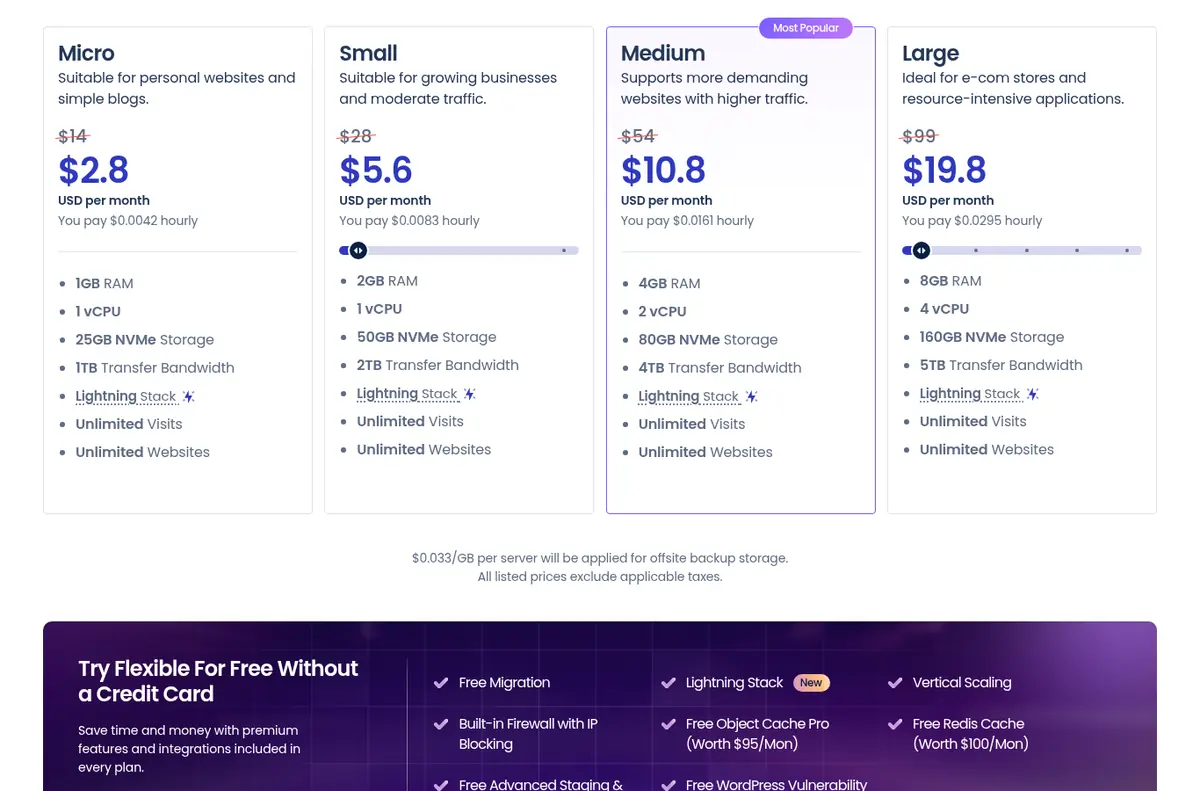
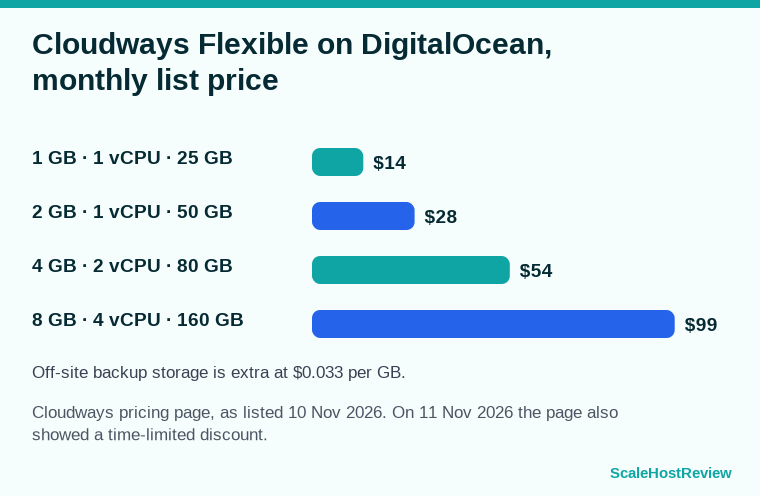
Cloudways Flexible prices (DigitalOcean, as listed 10 November 2026)
| Monthly price | Hourly rate shown | RAM | vCPU | Storage | Bandwidth |
|---|---|---|---|---|---|
| $14 | $0.0208 | 1GB | 1 | 25GB | 1TB |
| $28 | $0.0417 | 2GB | 1 | 50GB | 2TB |
| $54 | $0.0804 | 4GB | 2 | 80GB | 4TB |
| $99 | $0.1473 | 8GB | 4 | 160GB | 5TB |
Source: Cloudways pricing page, DigitalOcean server view, read 10 November 2026. Each plan card also lists unlimited visits, unlimited websites, the NGINX-based Lightning Stack and four free AI Copilot credits. Vultr, Linode, AWS and Google Cloud servers are priced separately on the same page.
"Unlimited websites" means Cloudways does not cap how many applications you install on a server. The pricing FAQ is candid that the real limit is the server's CPU and RAM: if either sits above 80% consistently, it suggests moving to a bigger plan.
Which cloud provider changes the price
Flexible lets you pick DigitalOcean, Vultr, Linode, AWS or Google Cloud for each server. The FAQ says DigitalOcean, Vultr and Linode charge the same price in every region, while AWS and Google Cloud prices depend on the region, usually cheaper in North America and Europe and more expensive in Asia Pacific and South America. You see the exact price for your region before you launch. The free trial covers DigitalOcean, Vultr and Linode only.
How hourly billing actually works
- Billed after use. Usage is tracked hourly. On the 1st of each month you get one invoice for the calendar month that just ended, charged to your saved card or PayPal.
- Monthly cap on three providers. For DigitalOcean, Vultr and Linode the hourly rate is the monthly price divided by 672 hours (28 days), and a full month is capped at the advertised monthly price. AWS and Google Cloud use a 30-day month.
- Plan changes are prorated. Switch plans mid-month and the invoice shows days on each plan.
- Stopping is not cancelling. A stopped server is still allocated to you and is billed as if it were running. To stop charges, delete the server and any paid add-ons.
- No annual plan, but you can prepay. You can load roughly 12 months of estimated costs into a Cloudways wallet; invoices are deducted from it as they are issued.
- Tax depends on your billing country. Registered businesses in eligible locations can enter a VAT or GST ID for exemption on future invoices.
The charges people miss
| Charge | Amount on the pricing page | Can you avoid it? |
|---|---|---|
| Off-site backup storage (Flexible) | $0.033 per GB per server (the FAQ gives roughly $0.50 per 15GB) | No. The FAQ says backups are mandatory and cannot be turned off |
| Bandwidth over the plan allowance | DigitalOcean and Linode $0.02/GB; Vultr from $0.01/GB; AWS $0.12/GB; Google Cloud $0.10 to $0.17/GB | Size the plan for your traffic; the server keeps running when you exceed it |
| Extra block storage | $1 per 10GB | Only if you add it |
| Cloudflare Enterprise add-on | From $4.99 per domain per month | Optional |
| Email hosting | Rackspace from $1.50 per mailbox per month (another section of the page says from $1) | Optional; many sites use a separate email provider |
| SafeUpdates for WordPress | From $3 per month | Optional |
For a small site the backup line is usually a few dollars. It grows with the number and size of sites on the server and how long you keep backups, so check it after the first invoice. Our guide to managed WordPress backups and retention explains what to keep and for how long.
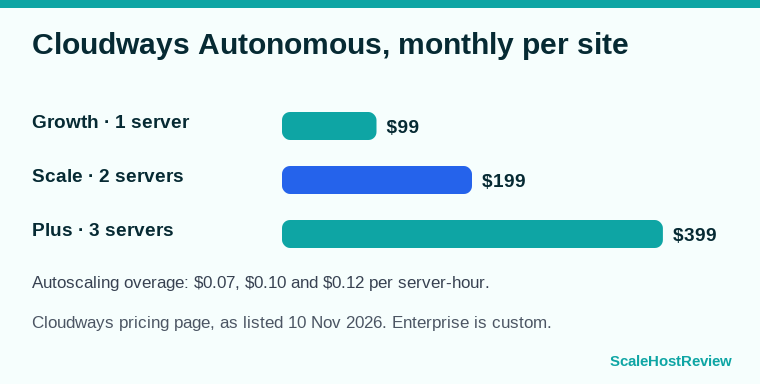
Cloudways Autonomous prices
Autonomous is a different product: fully managed, autoscaling WordPress on Google Cloud, priced per website rather than per server.
| Plan | Monthly price | Baseline autoscale servers | Bandwidth | Disk | Autoscaling overage |
|---|---|---|---|---|---|
| Growth | $99 | 1 | 150GB | 20GB | $0.07/hr per server |
| Scale | $199 | 2 | 250GB | 50GB | $0.10/hr per server |
| Plus | $399 | 3 | 1,000GB | 100GB | $0.12/hr per server |
| Enterprise | Custom | Custom | Custom | Custom | Custom |
Source: Cloudways pricing page, Autonomous section, read 10 November 2026. All three published plans list one website, unmetered visits and 100 PHP workers per server. Disk overage is $1/GB and bandwidth overage $0.04/GB on every plan. You can set an autoscaling budget threshold that pauses autoscaling when reached. The page lists a 99.9% uptime SLA and a 3-day trial with Growth-plan resources and no card required.
Flexible or Autonomous: which one fits
| Situation | Better fit | Why |
|---|---|---|
| Several small sites, an agency, or a developer who wants server access | Flexible | One server hosts many applications; you choose provider, size and PHP version |
| One business-critical WooCommerce, membership or LMS site with traffic spikes | Autonomous | Autoscaling, load balancing and failover without managing servers |
| A single brochure site on a tight budget | Flexible $14 or $28 | Autonomous starts at $99 for one site |
| You need a Node.js app hosted, not WordPress | Neither of these; see Cloudways Velocity | Velocity is a separate Node.js product on the same pricing page, from $20/month |
Estimating your real monthly bill
- Start with the server: $28 a month for a 2GB DigitalOcean server is a common starting point for one to three small WordPress sites.
- Add backups: estimate total backup size in GB times $0.033. Ten sites with 3GB of backups each would be about $1 a month.
- Add bandwidth overage only if your traffic exceeds the plan's allowance (2TB on the $28 plan).
- Add the add-ons you will actually turn on (Cloudflare Enterprise per domain, mailboxes, SafeUpdates).
- Add tax for your billing country. Cloudways shows a month-to-date estimate under Billing > Overview.
Trials, migrations and cancelling
Flexible has a 5-day free trial with no credit card. When it ends the trial server is deleted, but if you add a payment method it is restored with your apps and data. The page says Cloudways engineers will migrate your first website for free; Autonomous lists unlimited managed migrations. To cancel, delete your servers and paid add-ons; you get one final invoice for usage to that date. On Autonomous, a deleted application with a backup can be recovered for up to 15 days. The FAQ also spells out what happens if a payment fails: the dashboard is restricted on day 7, servers are stopped on day 10, applications and servers are deleted on day 13, and backups are permanently deleted on day 28. Keep a backup payment method on file.
Before you launch: check the PHP version
Cloudways' PHP article says new servers and applications default to PHP 8.2, which loses security support on 31 December 2026 (Cloudways PHP upgrade article). Switch new applications to 8.3 or 8.4 after testing; our PHP 8.2 end-of-life guide has the plan. For a wider comparison, see DigitalOcean vs Cloudways, Hostinger vs Cloudways, best managed WordPress hosting and best WooCommerce hosting.
 Start a Cloudways free trial →May earn a commission.
The Cloudways button is our affiliate link and may earn a commission. The pricing-page and documentation links are ordinary links.
How we checked this: we read the Cloudways pricing page, its billing FAQs and the PHP article on 10 November 2026. We did not open an account or receive an invoice for this article; your region, provider and add-ons will change the total.

Does a Cloudways staging site cost extra?
Short answer: on Cloudways Flexible, a staging copy is created as another application on a server you already pay for, so there is no separate staging fee, but it uses that server's disk and memory. On Autonomous, Cloudways allows one staging environment per application and counts its usage like any other.
If staging pushes your server close to its limits, the realistic cost is a larger server size, not a staging line item. Read the Cloudways staging guide for the current rules, and our WordPress staging on managed hosting guide for how pushes work and the WooCommerce database trap.
Weighing Cloudways against a per-site managed WordPress host? Cloudways vs Rocket.net compares both price lists as read on 13 November 2026.
Starter card, 20 November 2026
The Cloudways pricing page listed a Starter card at $20 a month for 2 GB RAM, 2 vCPU, 5 apps, 3 TB server bandwidth and 250 GB CDN bandwidth. See hosting.com vs Cloudways if you are comparing that card with a conventional hosting teaser.
Want to size a Cloudways Flexible plan from visits and page size? Use the free hosting cost and resource estimator (2027). It runs in your browser and does not send what you type.
Related buying and pricing pages
- Best managed WordPress and business hosting (2027)
- Rocket.net review (2027)
- Cloudways cloud providers compared (2027)
Frequently asked questions
How much does Cloudways cost per month?
Does Cloudways charge hourly?
Are Cloudways backups free?
Can I host multiple websites on one Cloudways server?
Is there a Cloudways free trial?
Am I charged if I stop my Cloudways server?
Does Cloudways offer annual billing?
Is staging included in Cloudways pricing?
Sources
Official pages, documentation and primary documents this page relies on. Where the text gives a price, limit or rule, it names the date that page was read. Vendors change pages; check the source before you buy.
- Cloudways pricing page cloudways.com
- Cloudways PHP upgrade article support.cloudways.com
- Cloudways staging guide support.cloudways.com
- Cloudways official site cloudways.comCommission link