Quick answer: Both Cloudways and Rocket.net offer one-click WordPress staging. Cloudways documents the most control: staging is free on Flexible if it sits on a server you already pay for, it is password-protected by default, and push-to-live lets you choose incremental or full file sync and a full or selected-table database push, with an optional backup first. On Autonomous, one staging copy per application is allowed and its visits, disk and bandwidth count against your plan. Rocket.net's public pages describe one-click staging and a publish-to-production action but not table-level control, so ask before you rely on it for a busy store.
A staging site is a private copy of your live WordPress site where you can test plugin updates, a new theme or a PHP version change before customers see it. Most managed hosts now advertise "one-click staging", but the details that decide whether a push goes smoothly differ a lot: what is copied, what it costs, whether search engines can find it, and above all what happens to your live database when you push. This guide compares how the two managed hosts we cover with approved partner links, Cloudways and Rocket.net, document those details. We read every source on 11 November 2026 and have not run a staging push on either host ourselves.
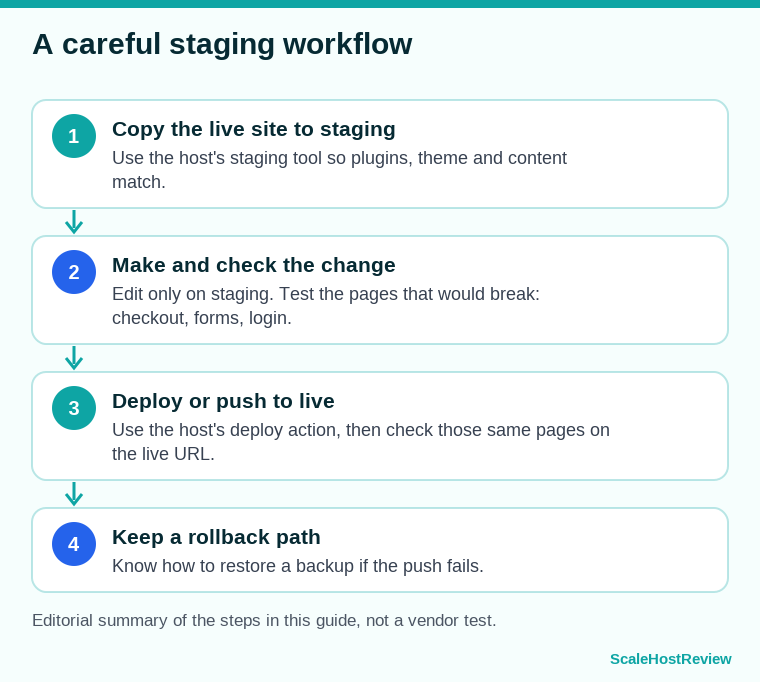
Short answer: create staging from the host's dashboard, keep it password-protected, test there, then push only what changed. On Cloudways choose Incremental files and Selected Tables if the live site takes orders or sign-ups. Always take a fresh backup of live before pushing, and purge your CDN cache afterwards.
Cloudways vs Rocket.net staging at a glance
| Cloudways Flexible | Cloudways Autonomous |  Rocket.net | |
|---|---|---|---|
| How you create it | Server → app → Staging Management → Launch Staging Application | Applications → app → Workflow/Tools → Staging Management → Launch | One-click staging from the Rocket.net control panel |
| Extra cost | None if staging sits on a server you already have; a new server is billed normally | Not a separate app, but visits, disk and bandwidth count toward your plan quota | Not stated on the pages we read; ask whether staging counts toward your plan's WordPress installs |
| How many | As many as disk space allows | One per application | Not stated on the pages we read |
| Default protection | Password-protected (.htpasswd); Cloudways says search engines can't index it | Password-protected by default; Cloudflare Enterprise in front | Free subdomain; protection settings not described on the pages we read |
| Push to live | Files: Overwrite or Incremental, exclude up to nine folders. Database: Full DB or Selected Tables. Optional backup first | Files: overwrite. Database: Full DB or Selected Tables. Optional backup first | Publish staging to production (runs as a background task, per Rocket.net's API reference) |
| Pull live to staging | Yes, same file and database options | Yes | Not described on the pages we read |
| Logs | Deployment logs of every push and pull | Deployment logs | Background task status (API) |
Sources: Cloudways: how to create a staging environment, Rocket.net WordPress control panel and Rocket.net API: push staging to live, all read 11 November 2026.
How Cloudways staging works
Cloudways' help article says staging is free on all plans, is a complete clone of the live application, and can be placed on the same server or a different one in your account (a different server must meet the application's minimum requirements). Application settings are not cloned, and the folder var/sessions is excluded from cloning. Your WordPress admin login is the same on staging and live until you change it (Cloudways staging guide).
Push options, and why they matter
- Web application files, Overwrite: replaces every file in
public_htmlon live, including.htaccessand configuration files. - Web application files, Incremental (Flexible): sends only files changed on staging. Files you deleted on staging are not deleted on live. You can exclude up to nine directories.
- Database, Full DB: overwrites the entire live database, including every table and its current values.
- Database, Selected Tables: overwrites only the tables you pick. Cloudways' own tip is to use this to avoid overwriting tables that hold user data or online orders.
- Backup: an on-demand backup of live before the push. Cloudways recommends it as your restore point.
After a push the staging copy stays available for more work. Cloudways also notes that its built-in search-and-replace only swaps your primary domain for the staging domain; if you have extra domains mapped, you need to replace those yourself in the database.
What staging costs on Cloudways
On Flexible, a staging app on a server you already pay for adds nothing to the bill, and you can launch as many as the server's disk allows. Launch it on a new server and that server is billed at the normal rate; see our Cloudways pricing guide for server prices and hourly billing. On Autonomous, staging is not counted as a separate application, but its visits, disk usage and bandwidth count toward your plan, and each application can have only one staging environment, which Cloudways says is for testing only and is not scalable.
How Rocket.net staging works
Rocket.net's control-panel page describes one-click staging: clone the site to a staging copy on a free subdomain, test themes, plugins, code or configuration, and manage the environment from the same dashboard (Rocket.net control panel). Its public API reference has a "push staging to live" action that "copies approved changes from your staging site to the live production site" as a background task (Rocket.net API reference). That is a whole-site publish as far as the public pages go. We did not find public documentation of incremental file sync, folder exclusions or table-level database selection, so if you run a store on Rocket.net, ask support how publishing treats orders placed on live after you created staging, and whether a staging copy counts toward your plan's install limit (Starter lists one WordPress install on the pricing page). Our Rocket.net review covers plans and limits.
The database trap on WooCommerce and membership sites
The moment you create staging, live and staging start to drift apart. Live keeps taking orders, new accounts, form entries and comments; staging keeps your test changes. A full-database push replaces live's database with staging's, which means everything written to live after the clone is lost. The safe patterns are:
- Push files only when the change is a plugin, theme or code update, then repeat any settings changes on live by hand.
- Push selected tables (Cloudways) when you changed settings stored in the database: typically options and the content tables you edited, never the order, customer or user tables.
- Pull live to staging first if staging is old, so you test against current data.
- Freeze writes briefly for a large redesign: put the store in maintenance mode, take the backup, push, check, reopen.
Our managed WordPress backups guide explains how long Cloudways keeps backups if you need to roll back, and best WooCommerce hosting compares hosts for stores.
Keep staging out of Google
A staging copy that gets indexed competes with your real site. Password protection is the strongest guard because crawlers cannot fetch the pages at all, which is why Cloudways turns it on by default. If you have to remove the password, for example to let a client review, use a noindex rule rather than relying on robots.txt alone: Google's documentation says that if a page is blocked by robots.txt the crawler never sees the noindex rule, and the page can still appear in results if other pages link to it (Google: block indexing with noindex). In WordPress, the "Discourage search engines" setting adds a noindex signal, but it is stored in the database, so a full-database push can carry it to live. Check that setting on live after every push.
Tell plugins they are on staging
WordPress has a standard way to label an environment: the WP_ENVIRONMENT_TYPE constant, with values local, development, staging or production. If it is not set, WordPress assumes production. The WordPress developer reference asks hosts that offer staging to set it to staging (wp_get_environment_type()). Plugins that send email, charge cards or sync with a CRM can use it to stay quiet on staging. Check whether your host sets it; if not, you can add it to staging's wp-config.php, and make sure that file is excluded from any push.
A push checklist
- Pull or recreate staging if it is more than a few days old.
- Disable outgoing email, payment gateways in live mode and CRM or marketing sync on staging.
- Test the change, including checkout, forms and logged-in pages.
- Take an on-demand backup of live (Cloudways offers it in the push dialog).
- Push in a low-traffic hour: files, then only the tables you changed.
- Purge the host cache and any CDN or WAF cache, such as Cloudflare. Cloudways says to clear browser and WAF caches if changes do not show.
- Check live: search-engine visibility setting, permalinks, checkout and one test order.
- Keep the deployment log entry with the date in case you need to explain a change later.
Moving to a new host rather than pushing an update? Start with what to measure before you migrate and the migration checklist. Upgrading PHP before the 31 December 2026 PHP 8.2 end of life is a good first job for staging: see PHP 8.2 end of life on managed hosting.
Which to choose for staging-heavy work
If you push changes often, run a store, or want to choose exactly what goes live, Cloudways documents the finer controls: incremental files, folder exclusions, selected tables, pull from live and deployment logs, with no extra charge on Flexible. If you want a simpler, fully managed WordPress host where staging is one click and Rocket.net handles the server, Rocket.net fits, as long as you confirm how its publish step treats your database. Compare both in best managed WordPress hosting and estimate costs with the hosting cost estimator.
 See Cloudways plans and staging →May earn a commission.
See Rocket.net's managed WordPress plans →May earn a commission.
How we checked this: we read the Cloudways staging help article, Rocket.net's control-panel and pricing pages and its public API reference, the WordPress developer reference and Google Search Central's noindex documentation on 11 November 2026. We did not create or push a staging site on either host for this article. Hosting features change; confirm on each host's own pages.
Compare prices before you buy
Our highest-intent guides, built from official pricing pages:
- Hosting renewal price increases: 24 plans from 8 hosts: our 2027 data study
- Cloudways alternatives compared: Rocket.net, WPX, SiteGround and more
- SiteGround vs Cloudways
- Rocket.net pricing
Frequently asked questions
Does Cloudways charge for a staging site?
Will pushing staging to live delete my WooCommerce orders?
Does Rocket.net include staging?
Can Google index my staging site?
How many staging sites can I have on Cloudways?
What is WP_ENVIRONMENT_TYPE?
Sources
Official pages, documentation and primary documents this page relies on. Where the text gives a price, limit or rule, it names the date that page was read. Vendors change pages; check the source before you buy.
- Cloudways: how to create a staging environment support.cloudways.com
- Rocket.net WordPress control panel rocket.net
- Rocket.net API: push staging to live rocketdotnet.readme.io
- pricing page rocket.net
- Google: block indexing with noindex developers.google.com
- wp_get_environment_type() developer.wordpress.org
- Cloudways official site cloudways.comCommission link
- Rocket.net official site rocket.netCommission link